V2EX Push Notifications Setup Guide
Last updated: September 30, 2026
The V2EX website has no iOS push notifications. VVAE is a native V2EX iOS app for iPhone and iPad. With push turned on, you hear about replies, mentions, thanks and favorites within about 30 seconds. Each notification says who did what and shows the topic title and the text. Notifications for the same topic are grouped, and tapping one opens the topic.
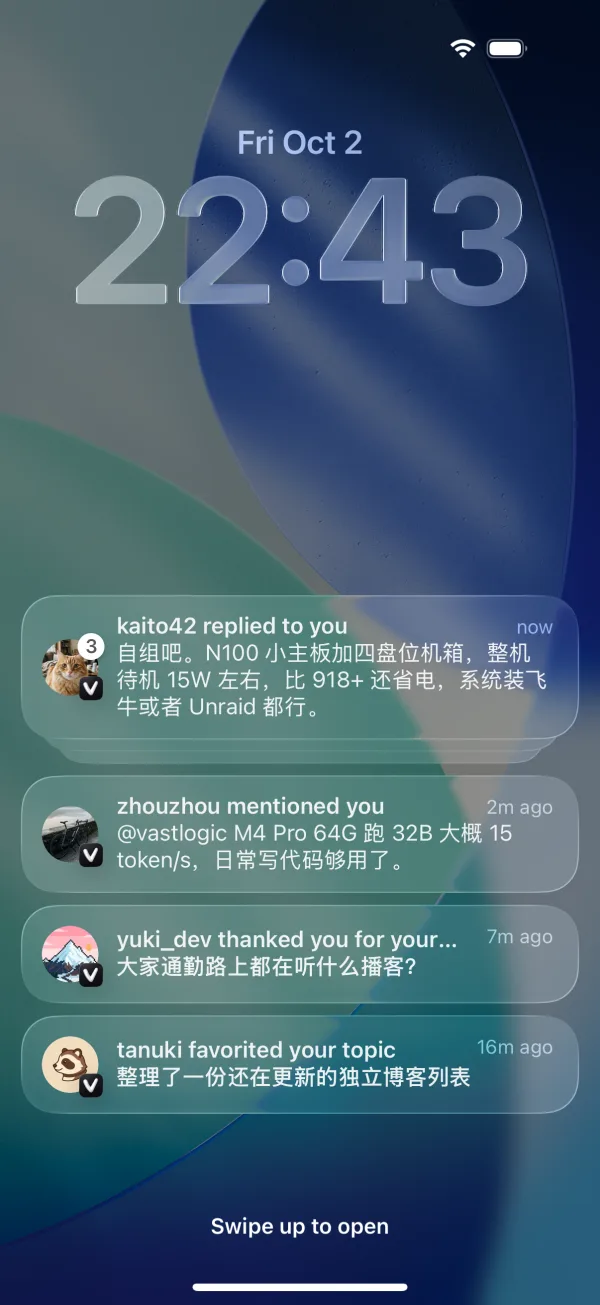
Push needs a small program, vvae-notifier, that you self-host on your computer, a NAS or a server.
Contents
How it works
- Poll. vvae-notifier runs wherever you deploy it and checks your V2EX notifications every 30 seconds over that machine’s network, using the V2EX API 2.0.
- Encrypt. When something new arrives, it encrypts it with a key that only the app and the notifier have, and hands it to the VVAE push relay.
- Deliver. The relay passes the ciphertext to Apple Push Notification service (APNs). VVAE's notification extension decrypts it on your phone and shows it as "someone replied to you".
Set up in four steps
Before you start, you need
- VVAE Premium, with your V2EX account signed in to VVAE.
- An always-on machine that runs Docker: a NAS (Synology, QNAP, Unraid and others), a VPS, a Raspberry Pi, or a Mac or PC running Docker Desktop that doesn't go to sleep. The image supports amd64, arm64 and arm/v7.
- Access to v2ex.com from that machine. If it can't reach V2EX, see Proxy.
- In VVAE, go to Settings › Push Notifications, turn on Allow Notifications, and allow notifications when iOS asks. The app creates a V2EX access token for you. It's valid for 180 days, and opening the app renews it before it expires.
- Tap Copy Docker Command.
- Paste the command into a terminal on your machine and run it. It looks like this.
VVAE_KEYis the deploy key the app generated for you, and it's different for everyone:
The first time, Docker says it can't find a container named vvae-notifier. That's the first part of the command removing an old container, and it doesn't affect the rest.docker rm -f vvae-notifier; docker run -d --name vvae-notifier \ --hostname "$(hostname)" --restart=always \ -v vvae-notifier:/data \ -e VVAE_KEY='vvaepush1.…' \ ghcr.io/vastlogic-dev/vvae-notifier:latest - Back in the app, Status changes to Connected and you get a "Notifier Connected" notification. From then on, new notifications arrive within about 30 seconds. Older ones from before you set it up are not sent.
What each part of the command does:
| Part | What it does |
|---|---|
--restart=always | Starts the notifier again after a reboot or a crash. |
--hostname "$(hostname)" | Gives the container your machine's name, so the Notifiers section in the app shows where it runs. |
-v vvae-notifier:/data | Keeps the notifier's state and settings, so a restart doesn't send duplicates. |
-e VVAE_KEY | The deploy key. Treat it like a password. |
After this, token renewals and changes to which notifications you get come from the app. You don't need to deploy again.
Other ways to deploy
NAS web UI
Create the container in your NAS's container manager (Synology Container Manager, QNAP Container Station and similar) with these settings:
- Image:
ghcr.io/vastlogic-dev/vvae-notifier:latest - Environment variable: name
VVAE_KEY. For the value, tap Copy VVAE_KEY in Settings › Push Notifications. - Storage: map a folder to
/datain the container. The notifier runs as uid 65532, so that user must be able to write to the folder. For example, over SSH:sudo chown 65532:65532 /volume1/docker/vvae - Hostname: optionally your NAS's name, so you can tell machines apart in the app.
- Restart policy: always.
Docker Compose
services:
  vvae-notifier:
    image: ghcr.io/vastlogic-dev/vvae-notifier:latest
    # optional: the machine name shown in the app
    hostname: my-nas
    restart: always
    environment:
      VVAE_KEY: ${VVAE_KEY}
    volumes:
      - data:/data

volumes:
  data:
Create a .env file in the same folder with the value from Copy VVAE_KEY in the app:
VVAE_KEY=vvaepush1.…Then start it:
docker compose up -dMultiple V2EX accounts
- Each V2EX account has its own deploy key. If push is on and you switch to another account in VVAE, the app creates a token and a deploy key for it.
- Copy Docker Command includes the deploy keys of every account on the device, so one container handles all of them. After adding an account, copy the command and run it again.
- To run a separate container for one account, open that account under Accounts and copy the command there.
- A device only receives notifications for the account currently signed in on it.
- With four or more accounts in one container, the notifier checks less often so it stays under V2EX's per-IP limit.
Update or stop
Update to the latest version
docker pull ghcr.io/vastlogic-dev/vvae-notifier:latestThen run the command you copied from the app again. With Compose:
docker compose pull && docker compose up -dStop push notifications
- Turn off Allow Notifications in the app, and this device stops receiving them.
- To stop the notifier from contacting V2EX, remove the container, and its state volume if you like:
docker rm -f vvae-notifier docker volume rm vvae-notifier - The token the app created expires after 180 days. You can also delete it at v2ex.com/settings/tokens.
Proxy
If the machine running the notifier can't reach v2ex.com, set HTTPS_PROXY. It accepts http://, https:// and socks5:// URLs, with an optional user:password@. Use NO_PROXY to exclude addresses.
If the proxy runs on the host, remember that 127.0.0.1 inside the container is the container itself. With Docker Desktop (Mac, Windows), use host.docker.internal. On Linux, use the host's LAN address or add --network host. For example:
-e HTTPS_PROXY=socks5://host.docker.internal:1080Status and troubleshooting
Status in Settings › Push Notifications can show:
| Status | What it means and what to do |
|---|---|
| Waiting for Notifier | The notifier hasn't checked in yet. Make sure the container is running and that VVAE_KEY was copied in full. |
| Notifier Offline | No heartbeat for more than 30 minutes. You get a "Notifications Stopped" alert, and another one if it's still offline after 24 hours. Check whether the machine is off, offline, or the container has stopped. |
| Token Invalid | Your V2EX token was deleted or revoked. Open VVAE and it creates and sends a new one. |
| Rate Limited by V2EX | Too many API requests from the same IP. The notifier pauses until the limit resets. |
| Notifier Error | A temporary network or V2EX error. The notifier retries on its own. If it doesn't recover, check the container logs. |
| N Notifiers Running | The same deploy key is running in several places, so each notification arrives N times. The Notifiers section shows which machines; stop the extra ones. |
| Couldn't Create Token | The app couldn't create a token on V2EX. V2EX allows 10 tokens per account; if you're at the limit, delete ones you don't use. |
| Notifications Off | Allow notifications for VVAE in iOS Settings › Notifications. |
Check the logs
docker logs vvae-notifierThe log is in Chinese. A healthy start shows 已应用配置 (config applied) and 已记录基线 (baseline recorded). The 8-character tag at the start of each line tells accounts apart.
- 状态目录 … 无法写入 (state folder not writable): the mounted folder needs write access for uid 65532. The notifier keeps running but may miss notifications after a restart. See NAS web UI for the fix.
- 轮询失败 (polling failed) keeps repeating: the machine can't reach V2EX. Check its network or set up a proxy.
- You shared your deploy key by mistake: tap Reset Push Key in Settings › Push Notifications. The old deployment stops working right away; copy the new command and deploy again.
Encryption and privacy
- The encryption key is created in the app and stays on your devices and in the notifier. Notifications and your V2EX token stay encrypted the whole way, so the relay can't read them.
- The relay only forwards pushes and never contacts V2EX. For what it stores, see the privacy policy.
- The notifier's source code is public on GitHub.
Still stuck? Feel free to reach us anytime at support@vastlogic.dev.